cmpt165
Spring 2007
CMPT 165-D2 @ Surrey: Lab 5
This lab serves two purposes:
- Increase your familiarity with uploading files to WebCT and the course server
- Encourage you to think more about the details of how formatting can be done with CSS.
-
Save this unstyled XHTML file. Create a stylesheet for this page. You will be styling only the menu list—the other list should remain unchanged.
- Make the menu list
floatto the left. Give it awidthof 6em. Give the<div id="main">a left margin of 7em, so it stays to the right of the menu. - Remove the bullets from the menu items by using the
list-style-typeproperty. - Set the colours and spacing of the elements so it looks something like the screenshot below.
- Hint 1: The list items are coloured by assigning a background colour, and thick left and right borders. The colours used in the screenshot were #44a, #aac, and #ccf.
- Hint 2: Whenever you're working on the spacing of elements, start by setting both the margin and padding to zero. This will give you a predictable starting point, by removing any browser defaults. Add margins and padding from there as needed.
margin: 0;
padding: 0;
You shouldn't be concerned about making your page look exactly like the screenshot, but it should be close. (The light-gray background was only added so you can see where the screenshot begins and ends. You can include it or not.)
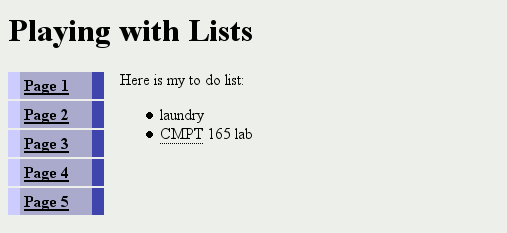
- Make the menu list
-
Make another copy of the unstyled XHTML file. Create another stylesheet for this page. (You should upload both XHTML pages and both CSS files when you're done.)
- Position the list items in the menu list on one line by setting the
displayproperty toinline. Remove the bullets from this list as well. - Set the borders around the
<li>, and the bottom border for the<ul>, as you see in the screenshot. Set the background colour and margins/padding as well. The colours used in the screenshot were #ccc and #eef. - Give the “current” menu item a different background colour, as in the screenshot.
- Remove the underline from the links in the menu, and set their colour to black.
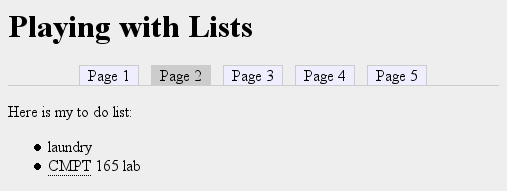
- Position the list items in the menu list on one line by setting the
Note that for this assignment you are making two copies of the XHTML file, with the only difference being the linked stylesheet.
As with Assignment 2, though, it is possible to have two distinct stylesheets for a single XHTML file. The code for doing it is like this:
<link rel="stylesheet" href="my_style1.css" title="Style 1" type="text/css" media="all" />

<link rel="alternate stylesheet" href="my_style2.css" title="Style 2" type="text/css" media="all" />
You can try this method if you like.
Once you are done your files, you must zip everything together in a single file, e.g. mylab5.zip (as per the instructions in your assignments) and upload that to WebCT.
When you're done, show your XHTML and CSS files to your lab TA.
Please note that you are expected to keep a copy of the work that you have done. You can keep a record on the student server (SIAT), a portable hard drive (e.g. key drive), or simply by email the URL you have created to yourself.