cmpt165
Spring 2007
CMPT 165-D2 @ Surrey: Lab 3
This lab may be completed outside of lab hours. However, you must show your work to the TAs during one of the lab slots from 1:30-5:20 in order to receive credit.
This lab is designed to give you more experience with CSS. The lab is in two parts. In the first part, you will work on creating a more complicated web page using CSS. In the second part, you will work on improving an existing web page based upon feedback from an HTML/CSS validator.
-
Either make a copy of your XHTML from lab 2, or download the lab 2 solution. Don't overwrite your lab 2 work yet: make sure you have a new copy. (Note: do not use Internet Explorer for this or other work in this course: it mangles HTML files it downloads. Use Firefox or Safari instead.)
For this part, you will create a new stylesheet for this page. Change the XHTML file so it uses a stylesheet called
lab3-style.css(instead oflab2-style.css).Create a CSS file (
lab3-style.css) and make these changes to the appearance of the page:- Set the background colour of the
<body>to light yellow (colour code#ff7), and the text colour to black (colour code#000). - Give the
<body>a margin of two times the font size (2em). - Set the font of the
<h1>to a sans-serif font. - Give the
<h1>a thin black border. You need to set the border's colour, line style, and thickness. - Change the background colour of the
<h1>to a lighter shade of yellow (colour code#ffa). - Change the “numbering” of the list so it uses letters (A, B, C, …). See the
list-style-typeproperty in the reference.
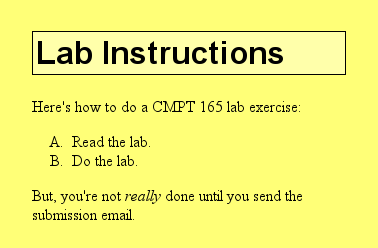
You will probably want to look at the CSS reference as you do this. With this CSS applied, the page should look something like this (depending on your browser, font size, window size, and other factors, of course).
- Set the background colour of the
-
Download this invalid XHTML file and the image from the page. (Again, use anything other than Internet Explorer.) Add the XHTML 1.0 doctype to the start of this file:
<!DOCTYPE html PUBLIC "-//W3C//DTD XHTML 1.0 Strict//EN"
        "http://www.w3.org/TR/xhtml1/DTD/xhtml1-strict.dtd">
Run it through an XHTML validator and have a look at the error messages. Fix the errors in the markup. As a good practice, when working with the validator, look at only the first error or two; fix them and try again. Sometimes fixing one error can cause other errors to change or disappear.
Once the page validates with no errors, you're done.

Finally, upload both the page you created and the page you corrected to your space on the cmpt 165 web server. Note, that if you are having problems uploading files now is the time to get help, and familiarize yourself with other means for uploading files (please refer to the Appendix A of your courseware). The TAs are here to help!
When you're done, show the URL of both the page you created, as well as the page you corrected, to your lab TA.
Please note that you are expected to keep a copy of the work that you have done. You can keep a record on the student server (SIAT), a portable hard drive (e.g. key drive), or simply by email the URL you have created to yourself.