cmpt165
Spring 2007
CMPT 165-D2 @ Surrey: Lab 2
This lab may be completed outside of lab hours. However, you must show your work to the TAs during one of the lab slots from 1:30-5:20 in order to receive credit.
This lab is designed to get you working more with XHTML, and to get you started with CSS.
-
Save this empty XHTML page as a starting point for your work on this lab (be sure to save it with the extension .html). Open it in a text editor. You will need some content for the file. Have a look at the following short set of sample instructions in figure 1—we will create a web page containing these instructions in.
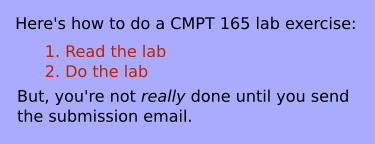 Figure 1: Content for the page
Note that the above is an image file—you will be creating an XHTML document that looks like this (but is not an image).
-
Start by filling in the
<title>and add an<h1>that both contain the same title. (Make up a reasonable title for such a page.) -
Now, fill in the rest of the content, as seen in the figure above. As always, you don't have to worry about the appearance in the XHTML: just pick tags that correspond to the type of content.
For example, the first words on the page are (part of) a paragraph, so they should go in a
<p>. You should have a look through the XHTML reference as you're doing this.In particular, look at the reference pages for
<ol>(and the<li>s that it contains), and<em>, for the emphasized word in the last sentence. -
Open the XHTML page in your browser. It won't look exactly like the figure above, but someone reading it should get the same information (i.e. it should convey the same information in close to the same format). That's all we're concerned about in the XHTML.
-
Save this sample CSS file in the same directory as the XHTML file you have been working on. Add this inside the
<head>of your XHTML file, so it uses the stylesheet:<link rel="stylesheet" href="lab2-style.css" type="text/css" /> -
Reload the page in your browser. It should now look much more like the figure above.
-
Modify the stylesheet so that the
<h1>has…- a black background (colour code
#000) - a light blue text colour, to match the background colour (colour code
#aaf).
- a black background (colour code
-
Upload both the
.htmland.cssfiles to your space on the course web server. Check to make sure that the page works on the server and still looks the same. The URL will be something like:http://cmpt165.cs.sfu.ca/~userid/lab2.htmlIf you would like to organize your work into directories inside your
public_html(e.g. ../public_html/lab1, etc), feel free. Just make sure you demonstrate a working URL.
When you're done, show the URL of the page (that you visited in the last step) to your lab TA.
Please note that you are expected to keep a copy of the work that you have done. You can keep a record on the student server (SIAT), a portable hard drive (e.g. key drive), or simply by email the URL you have created to yourself.